
Download HeadSnap – AI‑Powered Professional Headshot Generator
Overview
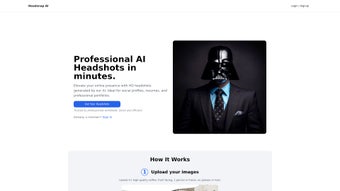
HeadSnap is a web‑based, AI‑driven headshot generator that turns a single clear portrait into a polished professional image, a vintage‑style Victorian illustration, or a vibrant anime avatar. Built by BitHeap.tech, the service uses deep‑learning models to analyse facial geometry, lighting, and background details, then re‑creates the picture in the chosen artistic mode within seconds. The tool is aimed at busy professionals, freelancers, content creators, and anyone who needs a high‑quality personal image without hiring a photographer or illustrator. By simply uploading a photo, enabling JavaScript, and selecting one of three styles, users receive a downloadable PNG or JPG ready for LinkedIn profiles, email signatures, social media, or printed business cards. HeadSnap guarantees a minimum resolution of 1080 px on the longest side, ensuring sharpness across both web and print media. Although the current offering is limited to three predefined styles and operates solely as a browser application (no dedicated mobile app yet), its speed, ease of use, and AI‑backed quality make it a compelling option for fast, reliable headshot creation.
Key Features
- Three Distinct Visual Styles: Professional (clean corporate look), Victorian (ornate 19th‑century portrait), Anime (bright, stylised cartoon).
- AI‑Enhanced Image Processing: Convolutional neural networks preserve facial fidelity while applying artistic filters.
- Instant Generation: Typical processing time is under 10 seconds per image on a standard broadband connection.
- High‑Resolution Output: Minimum 1080 px on the longest side; premium users can select up to 4K resolution.
- Secure Cloud Handling: All uploads travel over HTTPS and are automatically deleted after processing.
- Web‑Only Accessibility: No software download required; works in any modern browser with JavaScript enabled.
- Free Tier with Optional Paid Upgrade: Up to three free renders per day; premium plans unlock unlimited renders, batch processing, and extra customisation options.
Each visual style is crafted to meet specific branding needs. The Professional mode applies subtle lighting adjustments, a neutral colour palette and a clean background, making it ideal for corporate bios and conference speaker pages. The Victorian style adds period‑appropriate attire, ornate frames and sepia tones, appealing to creatives who want a vintage flair. The Anime mode transforms facial features into exaggerated eyes, vivid hair colours and a line‑art background, perfect for streamers, gamers, or anyone seeking a playful online persona. Because the AI engine has been trained on thousands of reference images, each output maintains natural skin tones and accurate facial geometry, avoiding the uncanny‑valley effect common in many generic filters.
Installation, Usage Instructions & Compatibility
No Download Required – Browser‑Based
HeadSnap runs entirely in the browser, so there is nothing to install. Visit the official website https://headsnap.bitheap.tech, ensure JavaScript is enabled, and you’re ready to start.
Step‑by‑Step Workflow
- Upload a Source Photo: Drag‑and‑drop or use the file selector. The AI checks for a single face; if multiple faces are detected, you’ll be prompted to crop to the primary subject.
- Select a Style: Choose “Professional,” “Victorian,” or “Anime.” A preview thumbnail shows a quick visual of the applied filter.
- Generate the Headshot: Click “Create.” The server processes the image and returns a high‑resolution result within seconds.
- Download & Share: Save the PNG or JPG file, or copy a direct link for quick sharing on social platforms.
- Premium Enhancements (Optional): Advanced users can adjust background colour, tweak facial expressions, or process up to 20 images in a single batch.
Operating System Compatibility
HeadSnap works on Windows 10/11, macOS 10.15+ (Catalina and later), Linux distributions with a modern browser, Chrome OS, and mobile browsers on Android and iOS. Because the application is web‑based, the user experience is optimal on desktop screens; tablet and phone browsers can access the service but may experience a slightly condensed layout.
Security & Privacy
All image uploads travel over encrypted HTTPS connections. BitHeap.tech’s privacy policy states that files are stored temporarily (no longer than 30 minutes) and automatically purged after rendering. No personal data is retained for free‑tier users, and premium accounts can opt for a “no‑log” configuration to meet GDPR or CCPA compliance requirements.
Conclusion, Pros & Cons, FAQ & Call to Action
Pros and Cons
Advantages
- Fast AI‑driven generation (under 10 seconds per image).
- High‑resolution output suitable for digital and print use.
- No installation needed – works directly in the browser.
- Secure, encrypted handling of uploaded photos.
- Three distinct artistic styles covering corporate, vintage, and pop‑culture needs.
- Generous free tier with daily limits.
- Premium plan adds unlimited renders, batch processing, and higher‑resolution options.
Drawbacks
- Only three predefined styles; users seeking niche aesthetics must wait for future updates.
- No dedicated mobile app yet, limiting on‑the‑go convenience.
- Free version limits batch processing to three images per day.
- Requires a clear, well‑lit source photo – low‑quality uploads may produce sub‑optimal results.
- Advanced editing (background removal, custom clothing) is restricted to premium subscribers.
Frequently Asked Questions
How many headshots can I generate for free?
The free tier allows up to three high‑resolution headshots per calendar day. There is no limit on the number of days you can use the service.
Do I need to create an account to use HeadSnap?
No. The web app works anonymously for the free version. An account is required only for premium upgrades and billing management.
Can I use HeadSnap on my smartphone?
Yes, any modern mobile browser that supports JavaScript can access HeadSnap, but the interface is optimised for desktop screens. A dedicated iOS/Android app is planned for a future release.
Is my uploaded photo stored permanently?
Uploaded images are encrypted during transfer and kept only temporarily (no longer than 30 minutes) for processing. After the headshot is generated, the original file is automatically deleted from the server.
What resolution will I receive for the final image?
All outputs are at least 1080 px on the longest side, which ensures clarity for LinkedIn, website avatars, and printed business cards. Premium users can choose higher resolutions up to 4K.
Final Thoughts & Call to Action
HeadSnap fills a niche that many professionals overlook: the ability to generate a polished, AI‑enhanced headshot in seconds without the cost of a photographer or graphic designer. Its three stylistic options cover corporate, artistic, and pop‑culture branding needs, while the secure, web‑only architecture makes it accessible from any computer with an internet connection. Although the current feature set is modest—limited to three styles and lacking a native mobile app—the speed, quality, and free daily allowance make it a valuable tool for freelancers, job seekers, and social‑media influencers alike. Power users who need unlimited renders, higher resolutions, and batch processing can upgrade to the affordable premium plan for added flexibility. If you’re ready to refresh your professional image or add a creative avatar to your online presence, give HeadSnap a try today.
Download HeadSnap now and start creating standout headshots in seconds.



.png)



